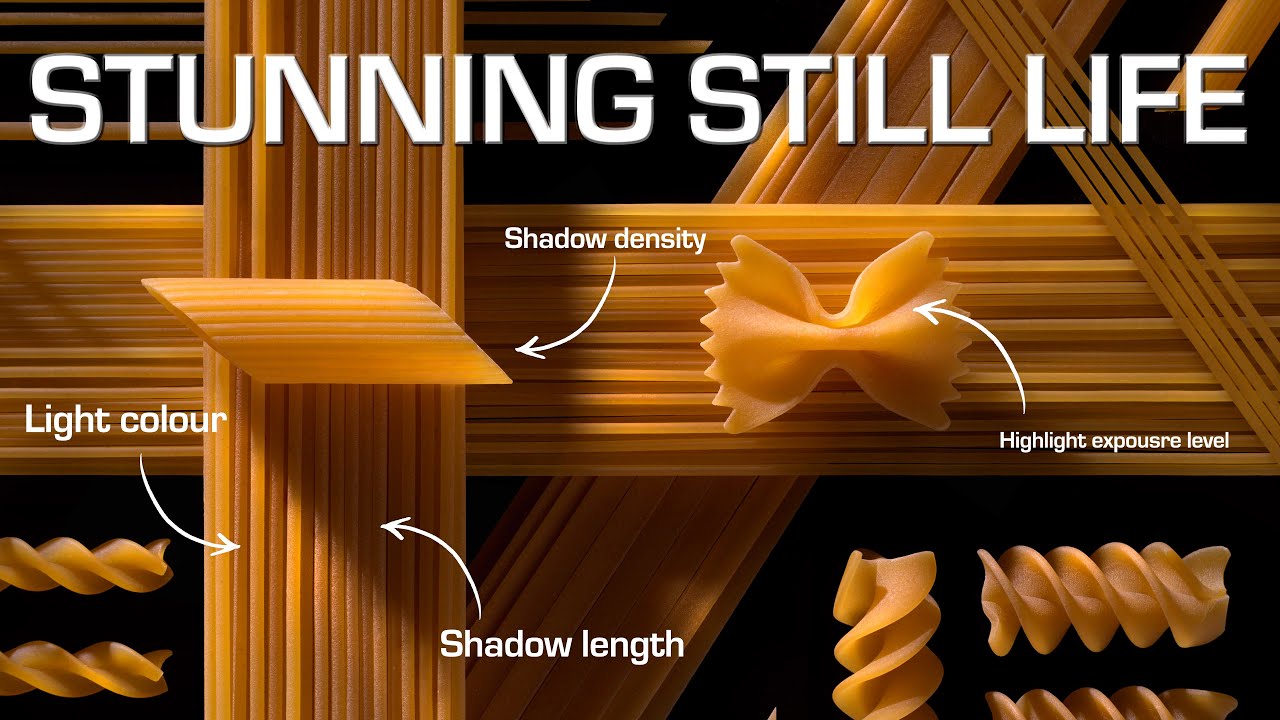
Still life photography has this reputation for being the quiet, unglamorous corner of the craft. Nobody’s posting still life work to impress anyone at a party. But here’s what I’ve found after years of shooting on location: the skills you build arranging and lighting objects on a table translate directly to every other kind of photography you do. Shadow control, highlight texture, mood through light angle. All of it. So when I came across Kyle Taylor’s tutorial from Visual Education, I watched the whole thing twice. Watch the full tutorial on YouTube and then come back here, because I want to walk through the technique step by step in a way you can actually apply tonight with gear you probably already own.
What makes this tutorial click is the subject choice. Kyle shoots pasta. Not pearls, not flowers, not expensive props from a styling kit. Pasta from the grocery store. Arranged carefully, lit with intention, and the results look genuinely stunning. Moody, textured, almost sculptural. That kind of outcome from that kind of subject is exactly what good lighting instruction looks like.
The tutorial actually covers two separate setups. The first uses a traditional key-and-fill approach with some clever shadow control. The second introduces light painting, where you fire multiple bursts of light during a single long exposure to build up illumination exactly where you want it. I’ll walk through both.
Step 1: Choose Your Subject with Texture in Mind
 Kyle reviewing finished pasta still life image on screen
Before you touch a single light, your subject needs to have something worth lighting. Kyle’s choice of pasta is smart for a very specific reason: it’s full of ridges, curves, and edges that respond dramatically to directional light. When you’re selecting objects for a still life, run your finger across the surface and ask whether low-angle light would reveal anything interesting. Smooth, flat surfaces can be beautiful, but they won’t show you the same play of highlight and shadow that a ribbed pasta shell or a rough ceramic bowl will.
Kyle reviewing finished pasta still life image on screen
Before you touch a single light, your subject needs to have something worth lighting. Kyle’s choice of pasta is smart for a very specific reason: it’s full of ridges, curves, and edges that respond dramatically to directional light. When you’re selecting objects for a still life, run your finger across the surface and ask whether low-angle light would reveal anything interesting. Smooth, flat surfaces can be beautiful, but they won’t show you the same play of highlight and shadow that a ribbed pasta shell or a rough ceramic bowl will.
Choose two or three shapes with different profiles. Kyle layers tagliatelle strands with pasta shells of varying shapes. That variety means different surfaces catching the light at different angles, which creates depth even before you’ve set up a single stand.
Step 2: Build the Arrangement in Layers
 Kyle describing arrangement process with pasta on elevated blocks
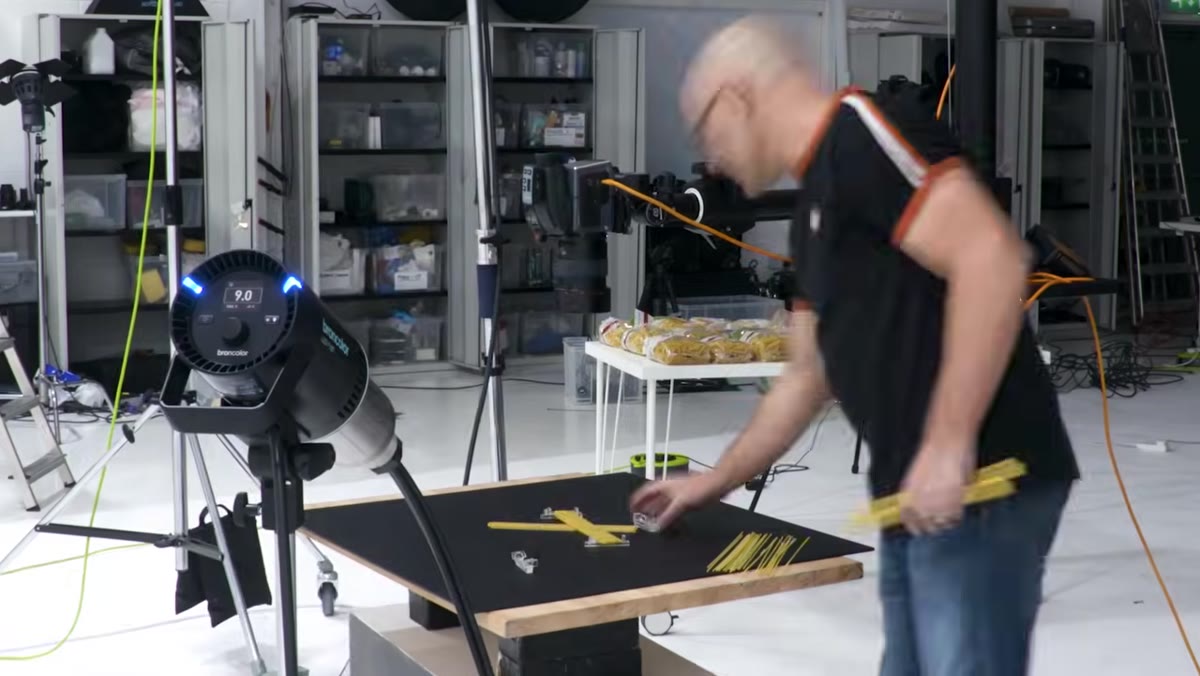
This step is the most time-consuming part of the whole shoot, and Kyle is honest about that. He places strands of pasta on small blocks to elevate them, then adds a second layer on blocks at a different height, and a third layer, and so on. The height variation is doing a lot of work here. Each layer casts shadows onto the layer below it, and those layered shadows are what give the final image that sense of depth.
Kyle describing arrangement process with pasta on elevated blocks
This step is the most time-consuming part of the whole shoot, and Kyle is honest about that. He places strands of pasta on small blocks to elevate them, then adds a second layer on blocks at a different height, and a third layer, and so on. The height variation is doing a lot of work here. Each layer casts shadows onto the layer below it, and those layered shadows are what give the final image that sense of depth.
Don’t rush the arrangement. Walk around it. Photograph it with your phone under your kitchen light before you commit. Move individual pieces until the composition feels like it has a natural flow, not a forced symmetry. Kyle spends considerable time on this before the lights ever come on, and you should too.
Step 3: Set Your Key Light Low and Directional
 Behind-the-scenes showing camera overhead and key light position
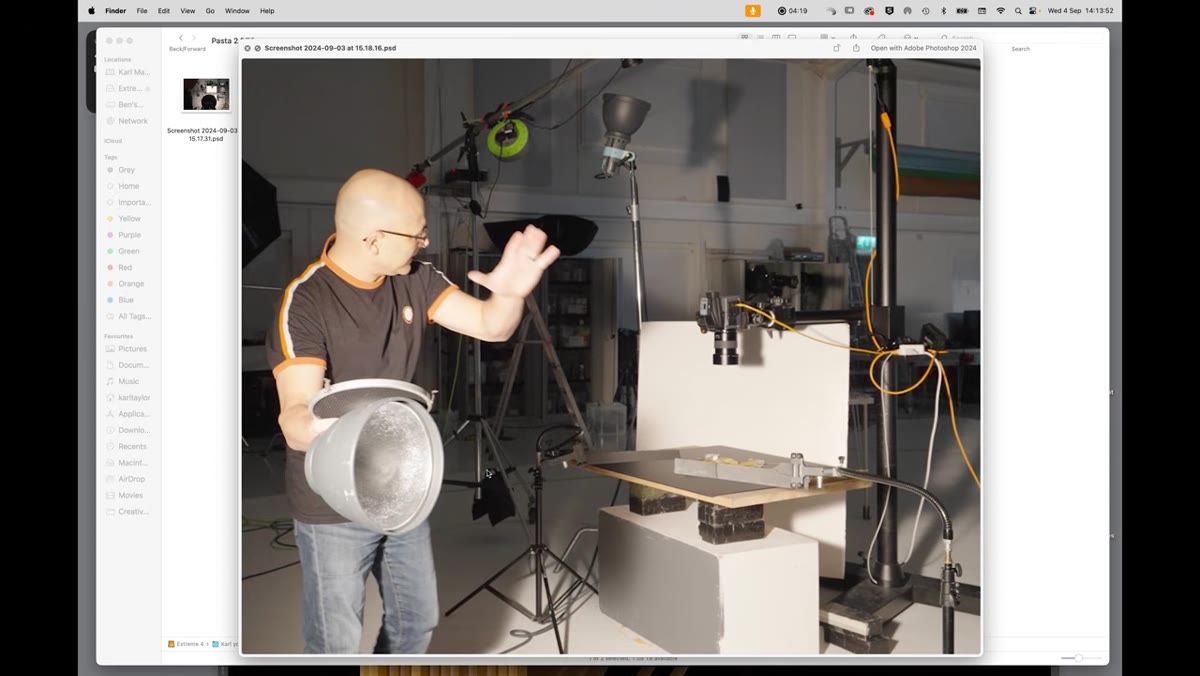
For the first setup, Kyle shoots from directly above and brings his key light in from a very low angle, almost parallel to the surface of the subject. This is the same logic as shooting landscape photos at golden hour. Low-angle light skims across surfaces and throws long shadows, which is exactly what reveals texture. If your light is coming straight down from above, you’ll flatten everything and lose the ridges and contours that make textured subjects interesting.
Behind-the-scenes showing camera overhead and key light position
For the first setup, Kyle shoots from directly above and brings his key light in from a very low angle, almost parallel to the surface of the subject. This is the same logic as shooting landscape photos at golden hour. Low-angle light skims across surfaces and throws long shadows, which is exactly what reveals texture. If your light is coming straight down from above, you’ll flatten everything and lose the ridges and contours that make textured subjects interesting.
Kyle uses a P70 reflector with a grid attached to narrow the beam. A grid controls spill, meaning it stops the light from spreading sideways and keeps it focused on a specific area. If you’re working with a speedlight and you don’t have a grid, you can tape a few layers of black straws or cardboard tubes over the front to get a similar effect. The goal is a tight, directional beam, not a broad wash of light.
Step 4: Use Flags to Shape the Shadow
 Black flags positioned to block key light from foreground area
A flag is any piece of black card or dark fabric you place between the light and the subject to block part of the beam. Kyle positions flags near the front of the setup to reduce the light intensity in the area closest to the light source. Without them, the near side of the subject gets blown out while the far side stays dark, and you lose control of the tonal range.
Black flags positioned to block key light from foreground area
A flag is any piece of black card or dark fabric you place between the light and the subject to block part of the beam. Kyle positions flags near the front of the setup to reduce the light intensity in the area closest to the light source. Without them, the near side of the subject gets blown out while the far side stays dark, and you lose control of the tonal range.
This is one of those techniques that sounds technical but is genuinely just problem-solving. If a part of your shot is too bright, block some light from hitting it. Black foam board from a dollar store works perfectly. Start with one flag and adjust its angle until you see the near-side highlights settle into a range you can control in post.
Step 5: Add a Bounce Fill for Shadow Control
 Second light aimed upward toward white ceiling for bounce fill
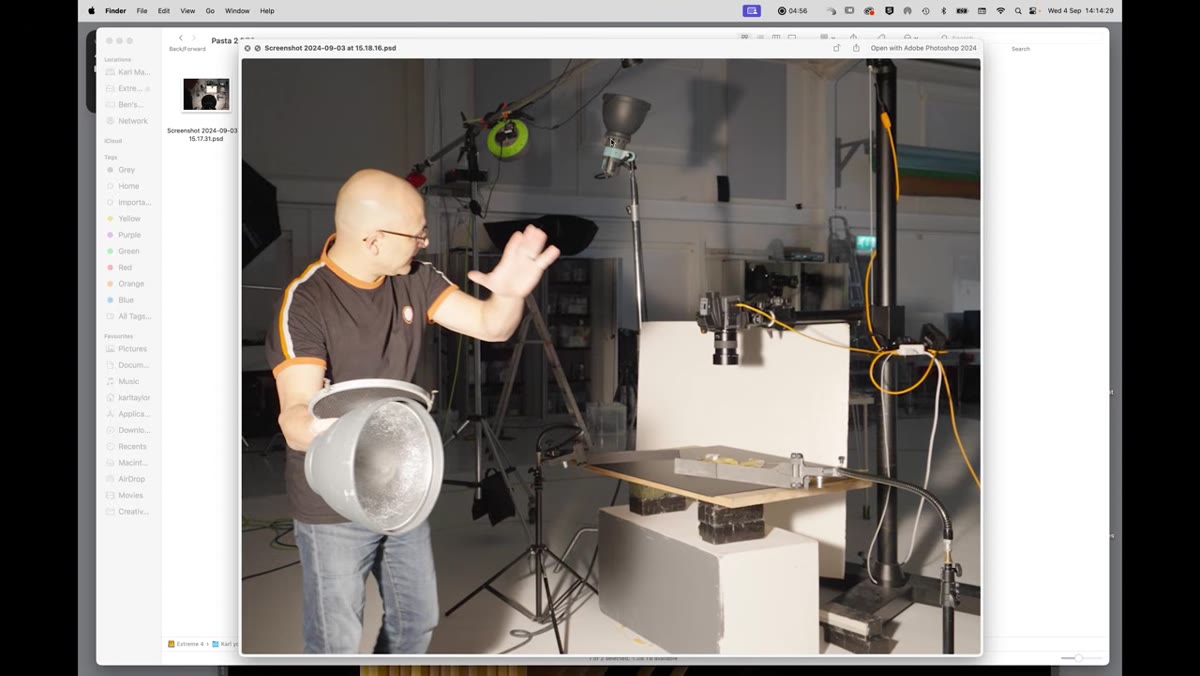
The second light in Kyle’s setup doesn’t point at the subject at all. It points up, bouncing off a white ceiling to create what he calls a global illumination fill. This is different from pointing a fill light directly at the shadows, which can look flat and artificial. Bounced light wraps around the subject more naturally.
Second light aimed upward toward white ceiling for bounce fill
The second light in Kyle’s setup doesn’t point at the subject at all. It points up, bouncing off a white ceiling to create what he calls a global illumination fill. This is different from pointing a fill light directly at the shadows, which can look flat and artificial. Bounced light wraps around the subject more naturally.
The key here is that this fill light is completely independent from your key light, which means you can increase or decrease it without changing anything about your main exposure. Want deeper, moodier shadows? Dial the fill down. Want a more even, airy look? Bring it up. A white foam reflector propped at an angle can substitute for a ceiling bounce if your room has dark or colored walls.
Step 6: Try Light Painting for the Second Setup
 Kyle explaining light painting technique with second pasta arrangement
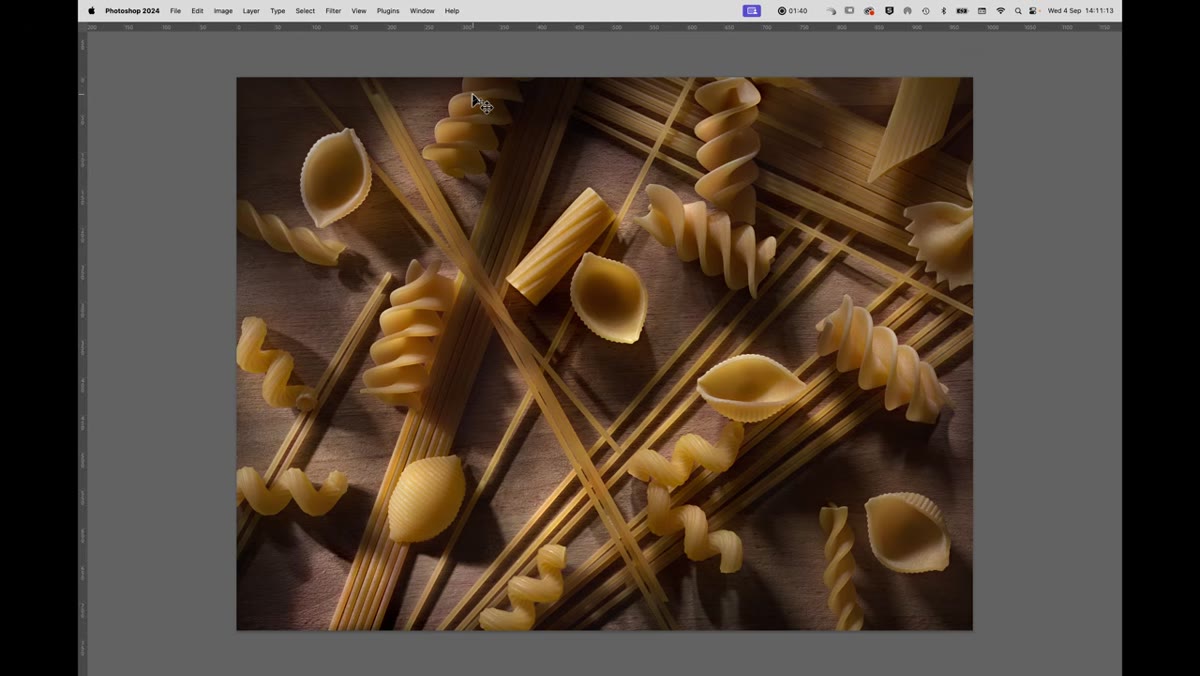
For the second pasta image, Kyle switches to light painting. The arrangement is more random, more scattered, and the lighting has a different quality because it was built up gradually. Light painting in still life means setting your camera on a tripod, using a long exposure (anywhere from 5 to 30 seconds depending on your light source), and firing a small, handheld or portable light at different parts of the subject during that single exposure.
Kyle explaining light painting technique with second pasta arrangement
For the second pasta image, Kyle switches to light painting. The arrangement is more random, more scattered, and the lighting has a different quality because it was built up gradually. Light painting in still life means setting your camera on a tripod, using a long exposure (anywhere from 5 to 30 seconds depending on your light source), and firing a small, handheld or portable light at different parts of the subject during that single exposure.
The result is that you have selective control over exactly which surfaces catch light, because you choose where to point it and for how long. Dark corners stay dark not because of flags but because you never pointed the light there. This technique rewards slow, methodical movement. Practice the motion before you start shooting so you’re not accidentally sweeping light across an area you wanted to keep in shadow.
What I’d Add from My Own Work
Light painting still life images look especially good when you combine them with a single tack-sharp element lit by flash. Fire a flash at the end of your long exposure to freeze the primary subject, and the rest of your painting exposure creates that slightly otherworldly ambient glow around it. I’ve done this with glass objects and the results always surprise people. The mixed quality of the light, part ambient movement, part crisp flash, creates a look that’s hard to achieve any other way.
If you’re just starting out with light painting, work in a room you can fully darken. Any ambient light leaking in during a long exposure will show up on the sensor and muddy the effect. A bath towel shoved under the door is not overkill.
The single most useful thing Kyle demonstrates in this tutorial is that shadow density is something you control deliberately, not something that just happens. You’re not fighting your shadows. You’re choosing them. That shift in thinking changes how you approach every lighting setup, not just still life work.
Watch the full tutorial on YouTube to see Kyle’s behind-the-scenes footage of both setups in action. Then grab whatever’s in your kitchen cabinet and try it yourself.
Comments
Leave a Comment