Introduction: Breaking the Rules of Traditional Lighting
When I first learned portrait lighting, I was taught the classic approach: key light first, then fill light, then hair light. But what if I told you that the most natural-looking window light portraits often come from doing the exact opposite?
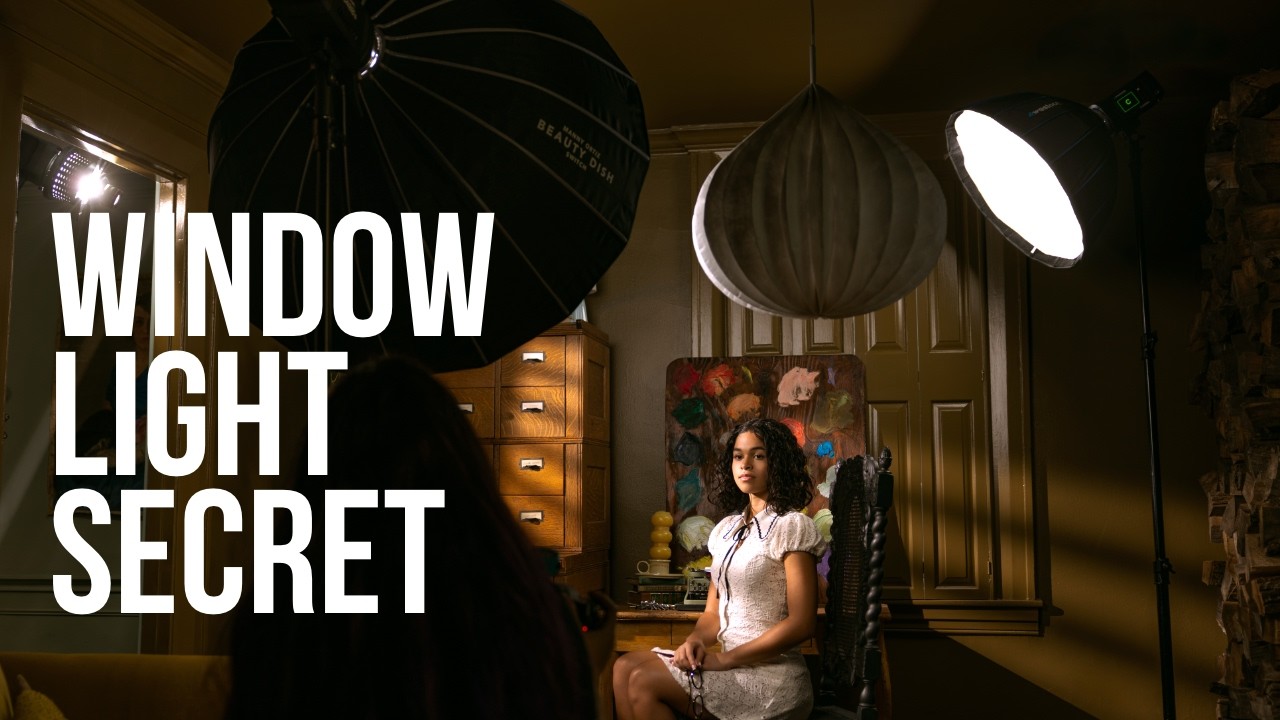
In this excellent tutorial, Joel Grimes and photographer Julie Gayler demonstrate a technique called “Reverse Lighting”—and it’s a game-changer for anyone serious about creating believable, cinematic portraits. The counterintuitive approach starts with your fill light and works backward, which prevents the flat, obviously-lit appearance that trips up so many photographers.
The real secret isn’t just about positioning strobes. It’s about understanding how shadows tell the story of your light. When you manage your shadows intentionally, you control the entire narrative of your image.
Understanding the Problem with Traditional Lighting
Before we dive into the solution, let me explain why so many studio portraits look artificial. When photographers light a scene with the traditional key-light-first approach, they often create harsh shadows that don’t match what real window light produces. Real window light—especially filtered through blinds—creates a specific ratio of highlights to shadows that our eyes recognize as “natural.”
The problem? You’re building toward the bright areas instead of sculpting from the dark areas. This often results in either:
- Overly flat portraits that lack dimension
- Harsh shadows that feel uncontrolled
- A lighting setup that looks obviously artificial
The reverse lighting method solves all three problems by changing your workflow entirely.
The Reverse Lighting Workflow: Step-by-Step
Step 1: Start with Your Fill Light
This is where the “reverse” happens. Instead of establishing your key light first, begin by placing a soft fill light. This light should be positioned close to your camera and act as your safety net—it prevents any area of your subject from falling into complete darkness.
I recommend using a moderate-powered strobe (400-800Ws) with a large modifier like a softbox. The fill light should be subtle enough that it’s not obviously creating exposure, but strong enough to preserve detail in the shadow areas. Think of it as your foundational layer.
Step 2: Establish Your Key Light (Now the Dramatic Element)
Once your fill light is locked in, position your main light source. In Julie’s tutorial, this light is positioned to simulate window light—typically at a 45-degree angle to your subject. This is where you create the drama and dimension.
The key light should be noticeably brighter than your fill light, creating a clear separation between lit and shadow areas. Position it where actual window light would come from in your scene. If you’re creating a sunset-through-blinds look, angle it slightly downward and from the side.
Step 3: Add Accent and Hair Lights (Optional but Recommended)
Now that your foundation is solid, you can add a back light or hair light to separate your subject from the background. This is where the cinematic quality really shines. A hair light creates dimension and prevents your subject from disappearing into the background.
Keep this light subtle—it should complement your key light, not compete with it. A smaller strobe (400Ws or less) works beautifully here.
Step 4: Control Your Shadows with Negative Fill
Here’s something Julie emphasizes that many tutorials skip: you can shape shadows by removing light, not just adding it. Position a large black flag or negative fill panel opposite your fill light to deepen shadow areas and increase contrast.
This is crucial for that authentic window light look. Real window light creates defined shadows on one side of the face. Negative fill helps you achieve this without adding more light sources.
The Technical Gear That Makes It Work
Julie uses professional-grade equipment in the tutorial: FJ800 and FJ400 II strobes with FJ-T1 triggers for reliable, consistent power. But here’s my honest take: you don’t need this exact gear to learn the technique. The principles work with any quality strobes and modifiers.
That said, good triggers and strobes with precise power control are important. You’ll be making fine adjustments throughout your session, and equipment that responds accurately makes this much easier.
My Personal Insights on This Approach
I’ve been using reverse lighting for about two years now, and it’s transformed how I shoot portraits. Here’s what I’ve learned:
The fill light ratio matters more than you’d think. Start with your fill light at about 1/3 to 1/2 the power of your key light. This creates a 2:1 to 3:1 lighting ratio—the sweet spot for most portrait work.
Window position changes everything. If you’re faking window light, where that light appears to come from matters enormously for believability. Typically, position it higher than your subject’s eye level and slightly to the side. Our brains expect window light to come from above.
Experiment with diffusion. Even if you’re not using actual window blinds (which Julie demonstrates with great results), diffusion material in front of your key light adds that characteristic soft-but-directional quality of real window light.
When to Use Reverse Lighting
This technique shines in several specific scenarios:
- Indoor portraits where you need to match existing ambient light direction
- Film noir or dramatic portraits where shadow play is essential
- Situations with reflective backgrounds where you need precise control over light fall-off
- Client work where you need consistent, professional results without excessive trial and error
Watch the Full Tutorial
While I’ve broken down the key concepts here, Julie’s hands-on demonstration is invaluable. You’ll see the exact positioning, hear her reasoning in real-time, and watch how subtle adjustments transform the lighting. Watch the complete step-by-step tutorial here to see this technique in action.
The reverse lighting workflow might feel counterintuitive at first, but once you understand the principle—start dark, build light carefully—it becomes second nature. And your portraits will look noticeably more professional for it.